
How to Measure Voice AI Latency (and What “Good” Looks Like)


Voice AI latency is the silence between a caller's last word and the agent's first sound. Here is the target, where the time goes, and how to measure the tail.
Callers don’t remember your voice agent’s median response time. They remember the slow turn, the one where they wait two seconds, say “Hello?” and get the agent’s answer on top of them.
Voice AI latency is the silence a caller sits through between their last word and the first sound of the agent’s reply. Time it for every turn (each time the caller speaks and the agent answers), and time it as the caller hears it, which includes the trip across the phone network, not just the time inside your servers. For a phone agent that chains speech-to-text (STT), an LLM, and text-to-speech (TTS), a good median is about 1.1 seconds, the 1,115 ms launch target Twilio publishes for this kind of agent.
Medians hide the slow turns, even for a single component. In our STT benchmark over the 30 days to October 19, 2026, Whisper Large v3 had almost the same median time to final transcript on two hosts, 114 ms on Baseten’s dedicated streaming endpoint and 110 ms on Together AI’s shared API. Its p95 was 251 ms on the first and 594 ms on the second. Same model, more than twice the tail.
So judge every release by its p95 and its slowest turn, and trace each slow turn back to the part of the pipeline that caused it. Start with the numbers to aim for.
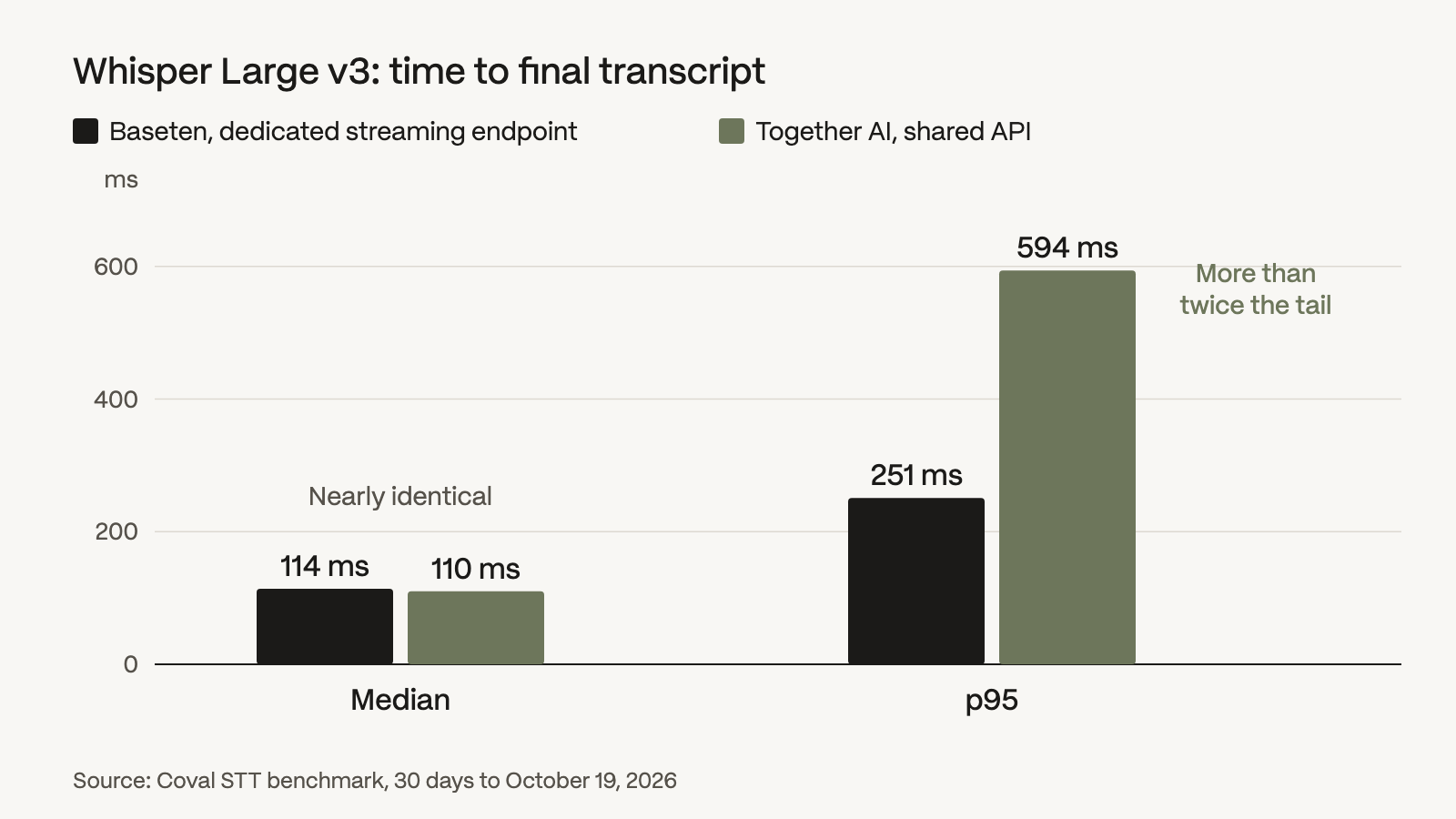 Same model, almost the same median, more than twice the tail. Source: Coval STT benchmark, 30 days to October 19, 2026.
What good voice AI latency looks like
You need two numbers: a launch target for the median gap, and a ceiling on the tail that no release may cross. Here’s where each reference number comes from and what it covers.
| Reference | Number | What it covers | Use it for |
|---|---|---|---|
| Human conversation, 10 languages (a 2009 study by Stivers and colleagues) | 0 to 200 ms | Most common gap between a question and its answer | The rhythm callers expect, not an agent target |
| Twilio mouth-to-ear turn gap, median launch target | 1,115 ms (upper limit 1,400) | Caller stops speaking to the reply reaching their ear | Your launch target for the full gap |
| Twilio platform turn gap, median launch target | 885 ms (upper limit 1,100) | Inside the voice agent platform only, excluding the internet and phone network | Your server-side budget |
| Coval Custom Agent Needs Reprompting | 2 s default (adjustable) | Agent silence long enough that the caller speaks again | A dead-air flag, not a target |
| Coval Custom Agent Fails to Respond | 5 s default (adjustable) | Agent silence after the caller’s final turn when a reply was owed | A dead-air flag, not a target |
Your ceiling comes from your own agent: run a baseline, record its p95 and its slowest turn, and fail any release that pushes either one up. The two Coval flags mark where a slow turn becomes a lost caller. We said it bluntly in a conversation with Baseten about self-hosting voice models: “the moment something doesn’t respond for five seconds, you’re going to assume all hope is lost and leave the conversation.”
Where the time goes in one voice AI turn
Every slow turn has a stage that owns it. A cascaded agent, one that passes each turn through separate STT, LLM, and TTS models, has up to six stages, and each waits on the one before:
- End-of-turn wait. The agent waits for silence, or for a turn-detection model, to decide the caller is done.
- Final transcript. Speech-to-text finalizes the last words once the turn ends.
- LLM first token. The model reads the transcript and context, then starts its reply.
- Tool round trip. If the model calls a tool, such as looking up an order, your code runs it and the model gets a second request with the result.
- First audible sound. Text-to-speech has to produce the reply’s first words, make a network round trip, and play any silence at the front of the audio.
- Return trip and playback. The audio travels back across the network and plays on the caller’s phone.
The end-of-turn wait is mostly idle time you set yourself: the agent listens to silence for a configured length, and the LLM can’t start until it ends. OpenAI’s server VAD example waits 500 ms of silence to end a turn. Deepgram notes that a streaming transcript isn’t final until the system decides the caller has stopped talking, a step it calls endpoint detection.
Vendor TTS figures cover less than the caller hears. ElevenLabs lists its Flash v2.5 model at ~75 ms, “excluding application & network latency.” On our leaderboard over the same 30 days, with the network included, the same model’s perceived time to first audio, from sending the text to the first audible sound, is 188 ms median and 243 ms at p95. Those measured numbers are what your turn pays, so pick TTS providers and STT providers on measured p95, then confirm on your own agent.
A speech-to-speech model hears the caller and speaks the reply itself, so transcription, the LLM, and speech synthesis become one stage. You time it the same way, from the caller’s last word to the first sound. On our speech-to-speech board over the seven days to November 9, 2026, the p95 of that wait ran from 1,101 ms for PolyAI’s Dialog-RSN-1, the fastest of ten models (it hears the caller’s audio directly but hands its reply to a separate TTS voice, and we time the whole pause), to 2,597 ms for Gemini 3.1 Flash Live; our voice AI models guide ranks all ten. Our speech-to-speech vs cascaded comparison covers the trade-off.
Phone calls add network time in both directions that your server never sees
On a phone call, part of that path runs outside your servers. The gap the caller hears is the trip from their phone to your server, your server’s own processing, the trip back, and playback on their handset. Agent-side metrics see only the middle, from after the trip in to before the trip back. LiveKit’s e2e_latency runs “from when the user stopped speaking to when the agent began responding”, and Twilio’s platform turn gap (in the table above) stops at the platform’s edge. Neither is what the caller hears.
That network time is not small. ITU-T, the standards arm of the International Telecommunication Union, publishes G.114 planning values for delay on phone networks. It puts a mobile network at 80 to 110 ms one way, and a cellular caller pays it twice per turn: once for their words going in, once for your reply coming back. That’s 160 to 220 ms your server never logs.
The audio format adds its own cost. Twilio Media Streams deliver a call’s audio to your app as 8 kHz μ-law mono (a low-bandwidth format built for phone lines). When a provider API silently converts that audio to the format its model expects, the conversion introduces latency.
So measure from where the caller sits. Coval’s simulated caller dials your agent’s number, and on a standard phone number the call routes through the public telephone network, just as a real caller’s does.
How to measure voice AI latency, step by step
From there, five steps take you from a recording to the stage that owns your slow turns.
- Record both sides of every call in stereo. Put the caller on one channel and the agent on the other, run voice activity detection on each, and time every turn from the end of a caller segment to the start of the next agent segment. Record test calls from the caller’s end of a real phone line, so each gap includes the network time in both directions. Coval takes uploaded production calls in the same stereo layout (“channel 0 is the agent and channel 1 is the user”) and scores each one with its Latency metric: “the average silence gap in seconds between the user finishing a turn and the agent starting to respond, counting gaps of at least 0.5 seconds.” That score shows which calls ran slow overall. The dead-air flags from the table catch a caller who has to speak again after a long silence, and a call that ends with the agent never answering.
- Trace every stage. Emit one OpenTelemetry span, a timed record of one step, for each stage: stt, llm, and tts, each with a metrics.ttfb attribute for its time to first byte, plus llm_tool_call for tools. Send the spans to Coval, or run npx @coval/wizard to auto-instrument a Pipecat, LiveKit, or Vapi agent. Coval turns the spans into LLM, STT, and TTS Time to First Byte, and its waterfall view of each call’s spans shows which one owns a slow turn.
- Compute per-turn medians, p95, and max, then count the calls that hit the tail. Pool the turn latencies from step 1 and report the median, the p95, and the slowest turn. Then work out the share of calls with at least one turn over your p95 ceiling, because that’s what callers live through. If 5% of turns are slow and turns are independent, 1 − 0.95¹⁰ ≈ 40% of 10-turn calls and 1 − 0.95²⁰ ≈ 64% of 20-turn calls contain at least one. That’s the compounding we described in the same Baseten conversation: “if you have 10 to 20 turns in the conversation, it’s really important that the long-tail performance is high because of the compounding effects.” Count the real share from your recordings instead of inferring it. Compute the same percentiles for each stage’s spans from step 2, but never add stage p95s to get an end-to-end p95. Percentiles don’t add.
- Test the conditions callers bring. Run test calls with personas, which set how a simulated caller sounds and behaves, including background noise and a low, medium, or high interruption rate. Then add concurrency: Coval load tests run up to 1,000 concurrent simulated calls. If your agent slows down at peak hours, this step reproduces it before launch. Our load testing guide covers the ramp.
- Compare every change on the same test set. When you swap a TTS provider or a model, run it as a mutation, a variant of your agent with one setting changed: Coval runs the base agent and each variant as separate simulations and shows the results “grouped by variant.” Keep the change only if the p95 and max from step 3 hold. A faster median with a fatter tail is a regression.
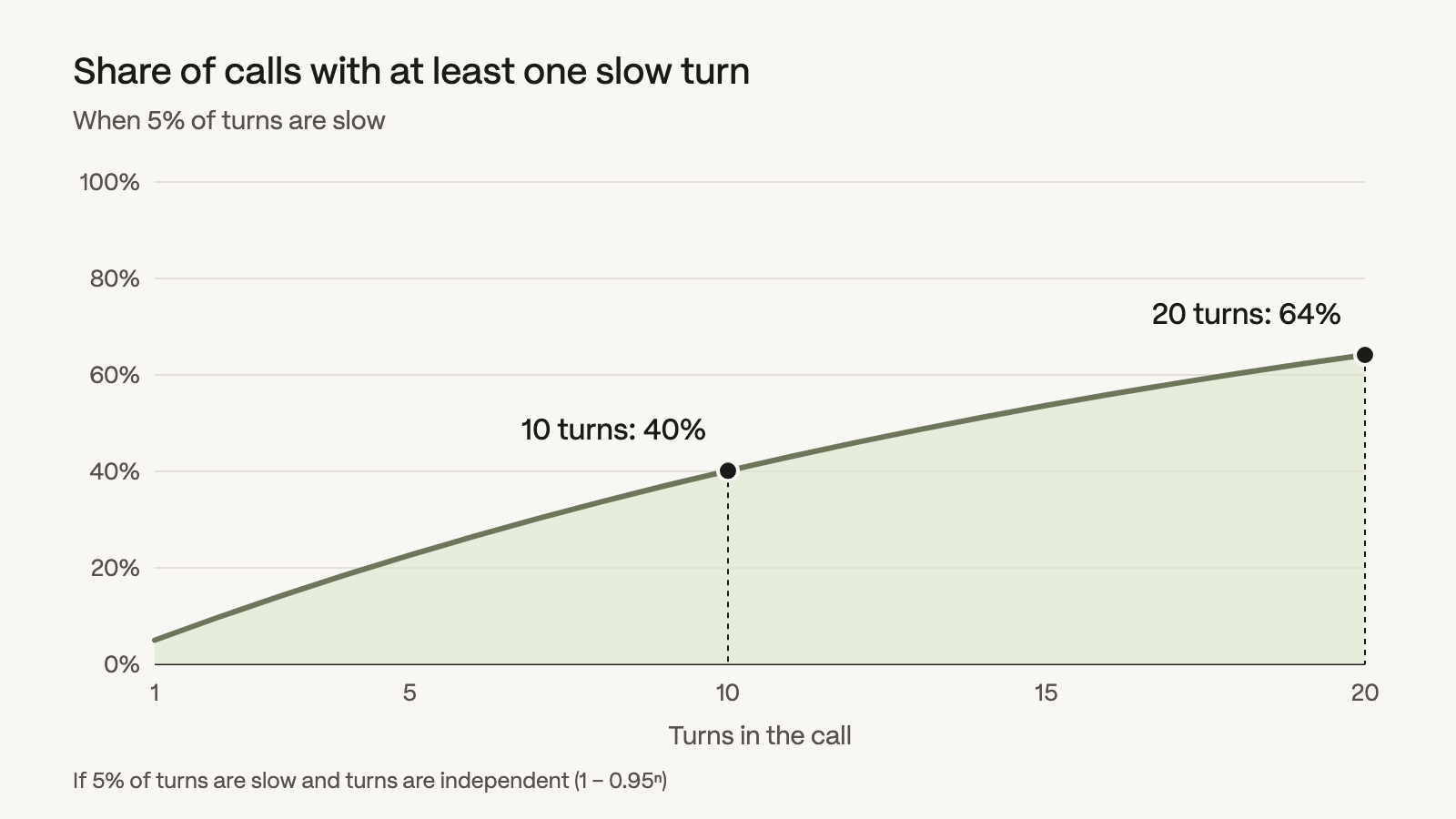 If 5% of turns are slow, 40% of 10-turn calls and 64% of 20-turn calls contain at least one.
Monitor voice agent latency in production and alert on the tail
Those five steps set your numbers before launch; production tells you when they move. That takes scoring every call, not a sample, which is the core of voice AI observability. Coval’s production monitoring does exactly that, then learns your baselines and flags drift the moment it starts.
Chart the per-call Latency score on a dashboard at P95, P99, and Maximum across calls, in 15-minute buckets, split by a metadata key such as carrier or region. A regression that hits one carrier disappears in the global average and stands out in its own line.
Then alert on the tail without guessing a universal threshold. A Baseline deviation alert checks how many conversations in a run (one batch of scored calls) fall outside the metric’s rolling baseline, and a Metric value alert checks each conversation on its own against your threshold. Both route to Slack, email, a webhook, or a human review queue.
Latency-driven hang-ups start as dead air. Agent Needs Reprompting counts every “Hello?” into the silence, and Agent Fails to Respond catches a call that ends with the agent silent when it owed a reply. Pull up the calls either one flagged and see how they ended. If flagged calls end in hang-ups more often than the rest, latency is costing you calls. As our benchmarking team put it in an AMA about our benchmarks, “a 15-second spike in latency feels exactly the same as if the entire service goes down.”
How to cut voice AI latency
Once the traces show which stage owns your slow turns, start with that stage’s fix below, and check p95 after every change.
- Shorten the end-of-turn wait. Smart endpointing, which uses a model to judge when the caller is done, cuts median latency compared with a fixed silence timer. But it “can also cause abrupt jumps in tail latency”, so watch p95 after the switch and run turn detection testing to make sure the agent doesn’t cut callers off.
- Stream every stage. Transcribe while the caller talks, send the LLM’s first sentence to TTS before the reply is finished, and play audio as it arrives.
- Keep connections warm. A fresh WebSocket to a speech provider pays for the TLS handshake, the upgrade, and any session setup before the first byte, about 50 to 200 ms in our benchmark methodology. Open it once per call, not once per turn.
- Put the agent near its providers. Every region hop between your telephony, your agent, and your model providers adds a round trip to every turn.
- Say something while a tool runs. A short spoken acknowledgment fills the round trip the caller would otherwise hear as dead air.
The caller who said “Hello?” never saw your median. They heard one slow turn. So measure every turn the way they hear it, and don’t ship a release that makes your p95 or your slowest turn worse. The quickest way to start is to point a simulated caller at your own number with latency and dead-air metrics attached, and hear that silence before your callers do.