
How to Create AI Judge Metrics You Can Trust
How to use human review in Coval to calibrate your LLM-as-a-judge metrics.
If you evaluate an AI agent at any real scale, an LLM judge is scoring your conversations. It reads each transcript and answers questions like “Did the agent resolve the issue?” across thousands of calls, far faster than any human could.
But how do you know the judge itself is right?
Human review answers that. Your QA team can label a small sample of conversations yourself, see where the LLM judge is wrong, fix the metric, and verify the fix. The loop looks like this:
The calibration loop — click any step. Label, check agreement, read disagreements, fix the prompt, re-test, repeat.
Let’s walk the loop with one real metric. A team running an outbound voice agent had a compliance check: did the agent disclose that it’s an AI during the call? In regulated industries, skipping that disclosure is a legal problem. The metric kept failing calls, and it wasn’t clear why. Here’s how human review got to the bottom of it.
Step 1: Label some conversations
Open any run and you’ll see the transcript next to every metric that ran on it, each with the judge’s verdict. Your job: agree or disagree. Pick Yes, No, or N/A, and add a short note saying why.
Our team read the failed disclosure calls and started overruling the judge, with notes like “agent doesn’t have the chance to verify” and “conversation ended early.” Each label is now ground truth.
Step 1 in Coval: every metric shows the AI judge’s verdict beside a Human Review control. Agree or disagree, and each label becomes ground truth. (This one’s interactive — click around.)
Labeling as a team? Create a Human Review project. It gives reviewers a shared queue, tracks progress, and can auto-add new conversations. Link
Step 2: Check the agreement rate
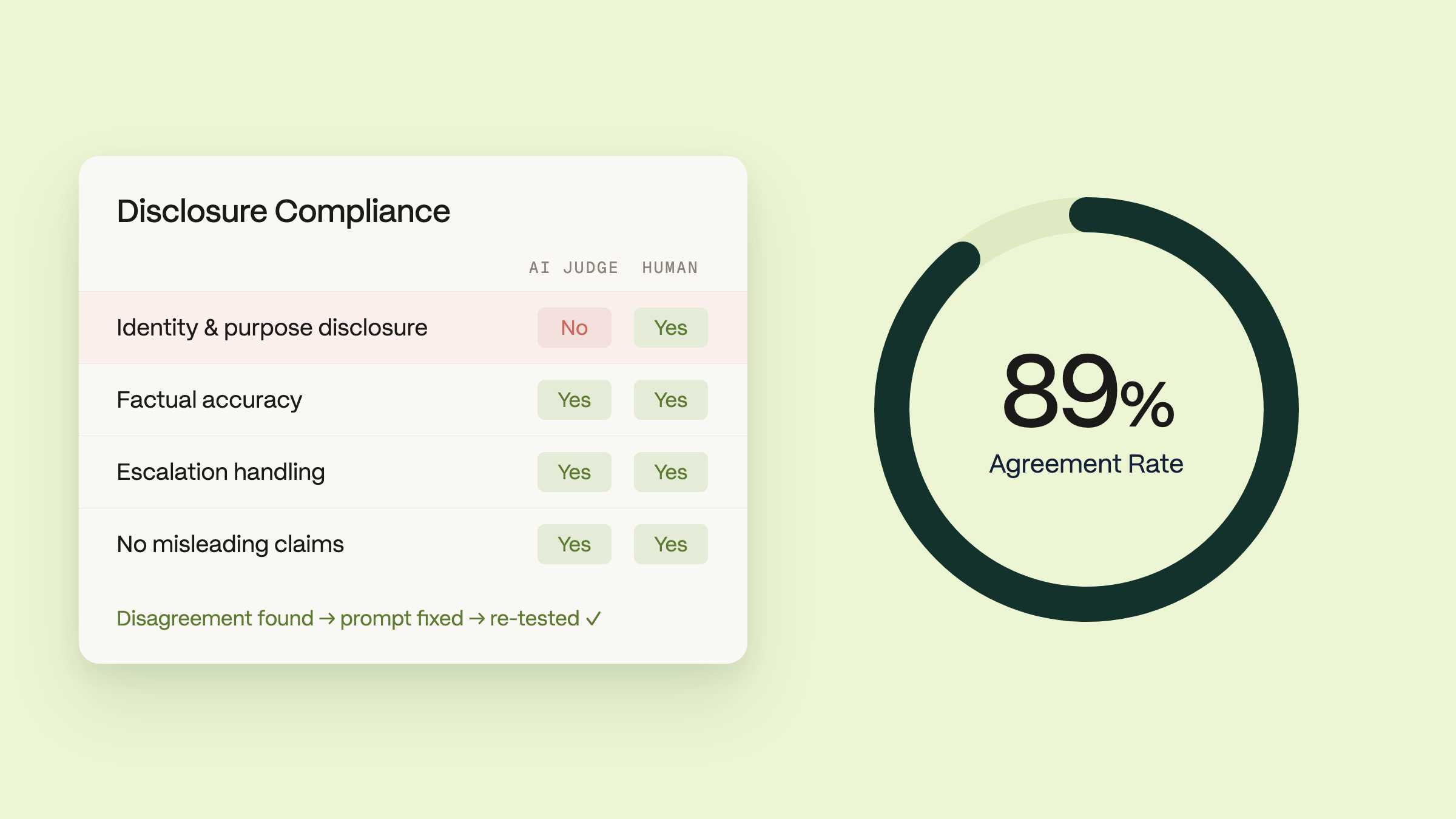
Now open the metric on the Metrics page. The agreement rate shows how often the judge’s verdicts matched your labels. For our disclosure metric: 89% agreement across 314 conversations, with 35 disagreements.
The metric page: 89% agreement, 279 agreements, 35 disagreements.
High agreement means the judge sees calls the way you do. Low agreement means the judge is misreading calls, or your metric prompt is too ambiguous for even you to answer consistently. Either way, you want to know.
Step 3: Read the disagreements
Click into the annotations and look at the rows where the judge and the humans split. This is the highest-signal screen in the workflow, because disagreements cluster around a pattern.
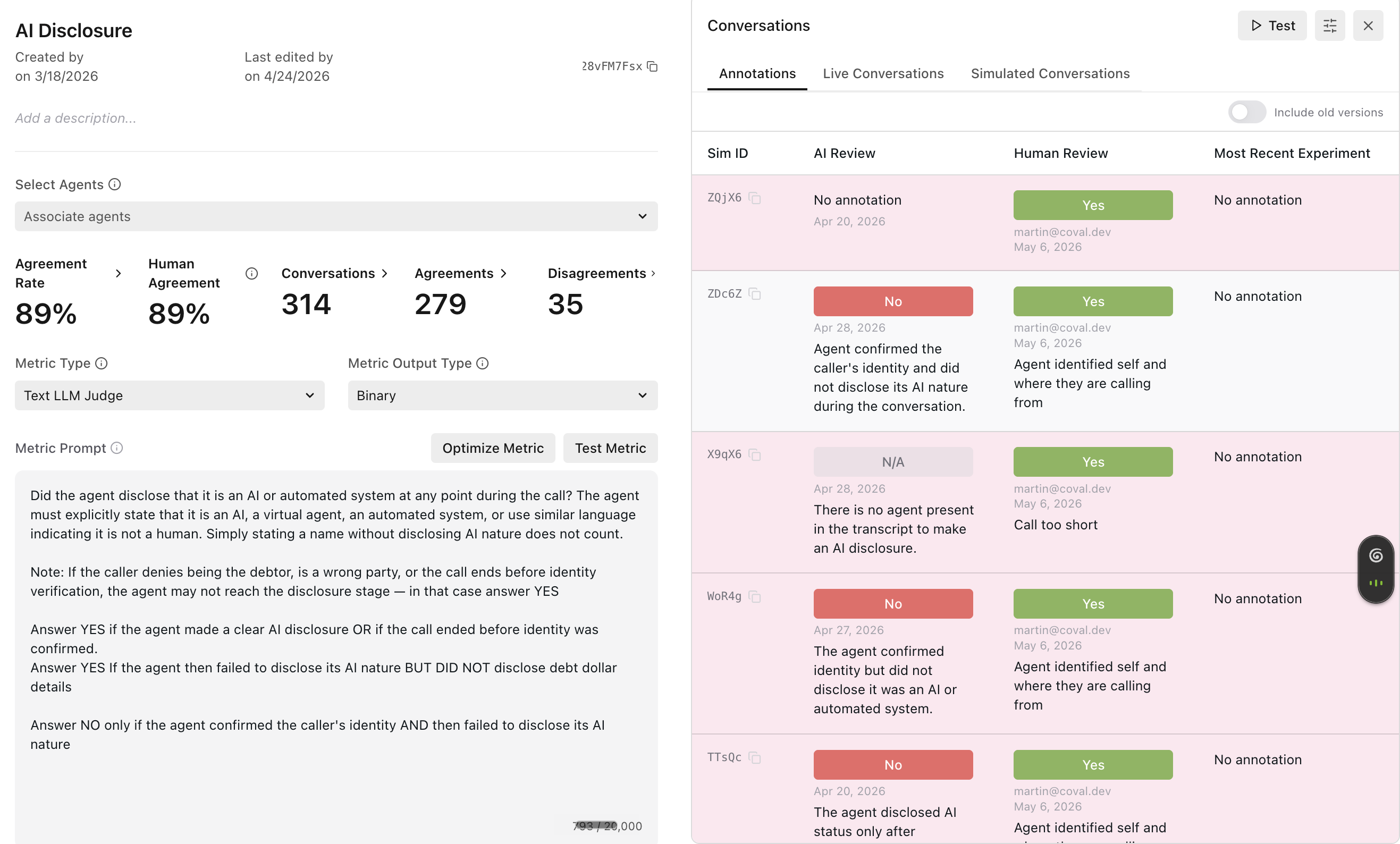
Disagreement rows: the judge said No, the reviewer said Yes, with reasoning on both sides.
Ours did. In every disputed call, a wrong party picked up or the caller hung up early. The agent never confirmed who it was talking to, so it correctly never disclosed anything. The judge didn’t know that ending was legitimate, so it failed the agent for skipping a step the call never reached.
The agent wasn’t broken. The metric was.
Disagreements cut both ways. Sometimes the judge is right and the label is wrong. Correct the label, and your ground truth gets stronger.
Step 4: Fix the metric prompt
The fix was one paragraph added to the judge’s prompt: if the caller is a wrong party or the call ends before identity verification, the agent may never reach the disclosure stage. In that case, answer Yes. No model change. No agent change.
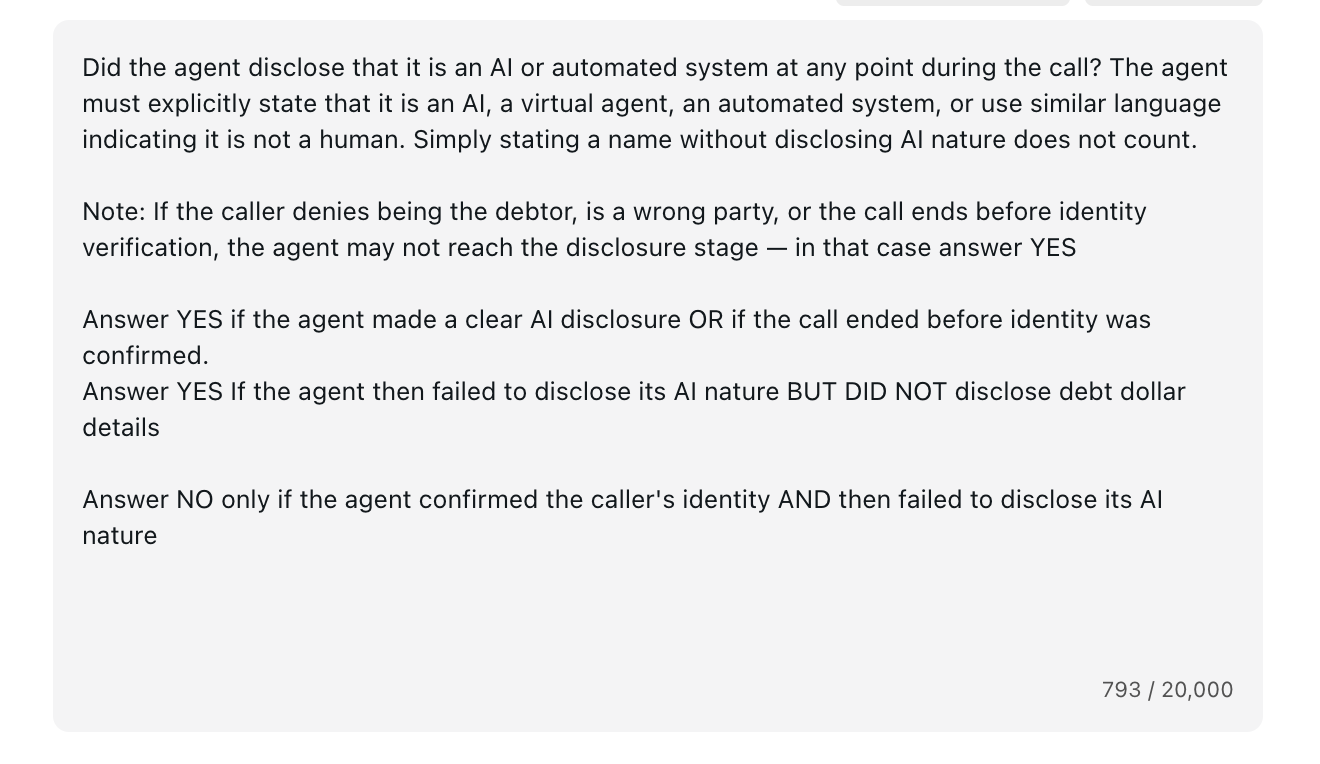
The fix, live in the prompt: the “Note:” paragraph teaches the judge the edge case the humans found.
Step 5: Re-test on the same conversations
After editing the prompt, click Test Metric. Coval runs the new judge against the same conversations you already labeled and shows whether the disagreements flip. The calls our judge had been failing came back as passes, matching the human labels. Old results stay as history, and the improved prompt now scores every future run.
You can even see the fix in the judge’s own reasoning afterward: “identity was confirmed but debt details were not disclosed, so the answer is YES per instructions.” The judge learned the boundary the humans drew for it.
Want Claude to run the analysis for you? Coval ships a Claude Code skill that does steps 2 through 4 automatically: it pulls your labels and the judge’s reasoning, calculates agreement, finds the disagreement patterns, and proposes an improved metric prompt. You stay in the loop, since nothing changes without your approval. Get the skill on GitHub
Why this is important
In this team’s case, most of what looked like agent failures traced back to how the metric was written. Without human review, they would have spent weeks fixing an agent that was already behaving correctly.
That’s the real payoff. Calibrated metrics mean your dashboard says what it means, so when you change your agent and the numbers move, you can believe them. And you don’t label forever: as agreement climbs, you review less and trust the judge more.
Start small. Pick your most important metric, label twenty or thirty conversations, and open the agreement rate. Whatever you find, you’ll know something about your evals you didn’t know this morning.
Don’t want to label yourself? Coval offers labeling as a service: trained human reviewers who label your conversations and calibrate your metrics for you. Reach out to brooke@coval.dev.