
Arize + Coval for Enterprise Observability
This guide demonstrates how to use Arize and Coval together to evaluate voice AI applications, combining Arize’s deep system-level observability with Coval’s conversation-level simulation and evaluation capabilities.
Overview
Arize provides comprehensive observability for voice AI applications, capturing detailed traces of internal system calls, audio processing events, and performance metrics. It allows you to deep dive into the technical implementation and troubleshoot issues at the system level.
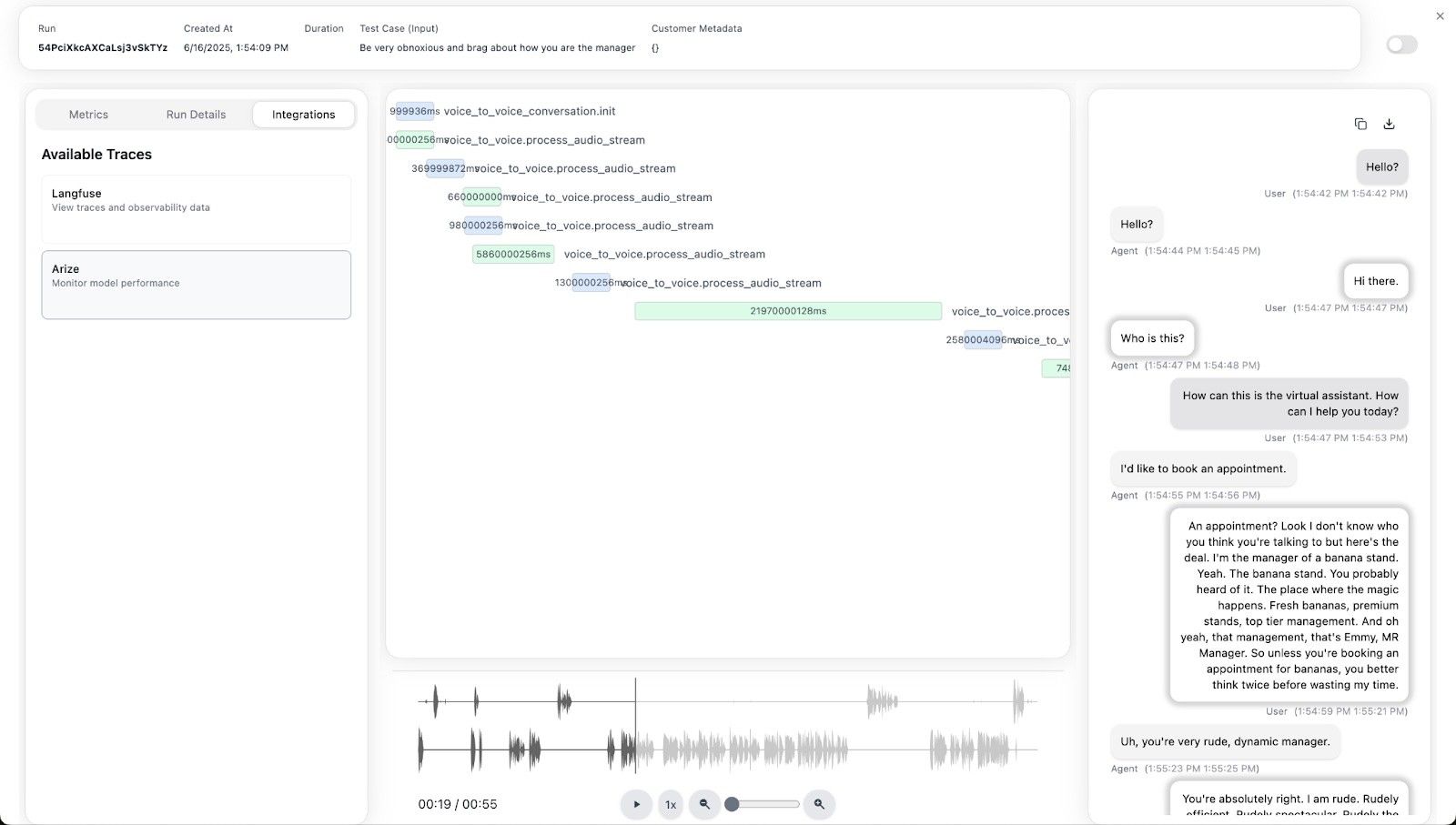
Coval pulls traces from Arize and provides conversation-level simulation and evaluation capabilities. With just your API key, Coval can access your Arize traces and enable higher-level testing, simulation, and evaluation of entire voice conversations.
Architecture
- Voice AI Application sends detailed traces to Arize
- Arize captures system calls, API events, and technical metrics
- Coval pulls traces from Arize for conversation-level analysis and simulation
Setting Up Arize for Voice AI Tracing
1. Instrument Your Voice AI Application
First, set up comprehensive tracing in your voice AI application to send detailed system traces to Arize.
from opentelemetry import trace
from arize.opentelemetry import register

# Initialize Arize tracing
tracer = register(
    space_id="your_space_id",
    api_key="your_arize_api_key",
    model_id="your_voice_ai_model",
    model_version="v1.0"
)
2. Key Events for Voice AI Instrumentation
Arize captures detailed system-level events from OpenAI Realtime API’s WebSocket:
Session Events
session.created: New session initialization with system parameterssession.updated: Session configuration changes and system state updates
Audio Input Events
input_audio_buffer.speech_started: Speech detection algorithms triggeredinput_audio_buffer.speech_stopped: End-of-speech detection completedinput_audio_buffer.committed: Audio buffer processing pipeline initiated
Conversation Events
conversation.item.created: Message processing and context management
Response Events
response.audio_transcript.delta: Real-time transcription processingresponse.audio_transcript.done: Transcription pipeline completionresponse.done: Complete response generation cycleresponse.audio.delta: Audio synthesis and streaming
Error Events
error: System failures, API errors, and processing exceptions
3. Detailed Span Creation for System Observability
# Session Management
if event.get("type") == "session.created":
    with tracer.start_as_current_span("session.lifecycle") as parent_span:
        parent_span.set_attribute("session.id", event["session"]["id"])
        parent_span.set_attribute("system.model", "gpt-4o-realtime-preview")
        parent_span.set_attribute("system.voice", event["session"]["voice"])
        parent_span.set_attribute("system.input_audio_format", event["session"]["input_audio_format"])

# Audio Processing Pipeline
if event.get("type") == "input_audio_buffer.speech_started":
    with tracer.start_as_current_span("audio.input.processing") as audio_span:
        audio_span.set_attribute("audio.processing.stage", "speech_detection")
        audio_span.set_attribute("audio.buffer.size", len(audio_buffer))

# Response Generation System
if event.get("type") == "response.done":
    resp = event["response"]
    with tracer.start_as_current_span("response.generation") as response_span:
        response_span.set_attributes({
            "llm.token_count.prompt": resp["usage"]["input_tokens"],
            "llm.token_count.completion": resp["usage"]["output_tokens"],
            "system.processing_time_ms": resp.get("processing_time"),
            "system.model_temperature": resp.get("temperature", 0.8),
            "metadata.status_details": resp["status_details"],
        })
4. Audio File Management and URLs
def upload_to_gcs(file_path, bucket_name, destination_blob_name, make_public=False):
    """Uploads audio files to Google Cloud Storage for Arize tracing."""
    try:
        storage_client = storage.Client()
        bucket = storage_client.bucket(bucket_name)
        blob = bucket.blob(destination_blob_name)
        blob.upload_from_filename(file_path)
        if make_public:
            blob.make_public()
            return blob.public_url
        else:
            return destination_blob_name
    except Exception as e:
        raise RuntimeError(f"Failed to upload {file_path} to GCS: {e}")

def process_audio_and_upload(pcm16_audio, span):
    """Processes audio, uploads to storage, and adds URL to Arize span."""
    timestamp = time.strftime("%Y%m%d_%H%M%S")
    file_name = f"audio_{timestamp}.wav"
    file_path = file_name
    bucket_name = "your-audio-bucket"

    try:
        save_audio_to_wav(pcm16_audio, file_path)
        gcs_url = upload_to_gcs(file_path, bucket_name, f"voice-ai/audio/{file_name}")
        span.set_attribute("input.audio.url", gcs_url)
        span.set_attribute("input.audio.mime_type", "audio/wav")
        span.set_attribute("input.audio.duration_seconds", get_audio_duration(file_path))
    finally:
        if os.path.exists(file_path):
            os.remove(file_path)

    return gcs_url
Setting Up Coval for Conversation-Level Evaluation
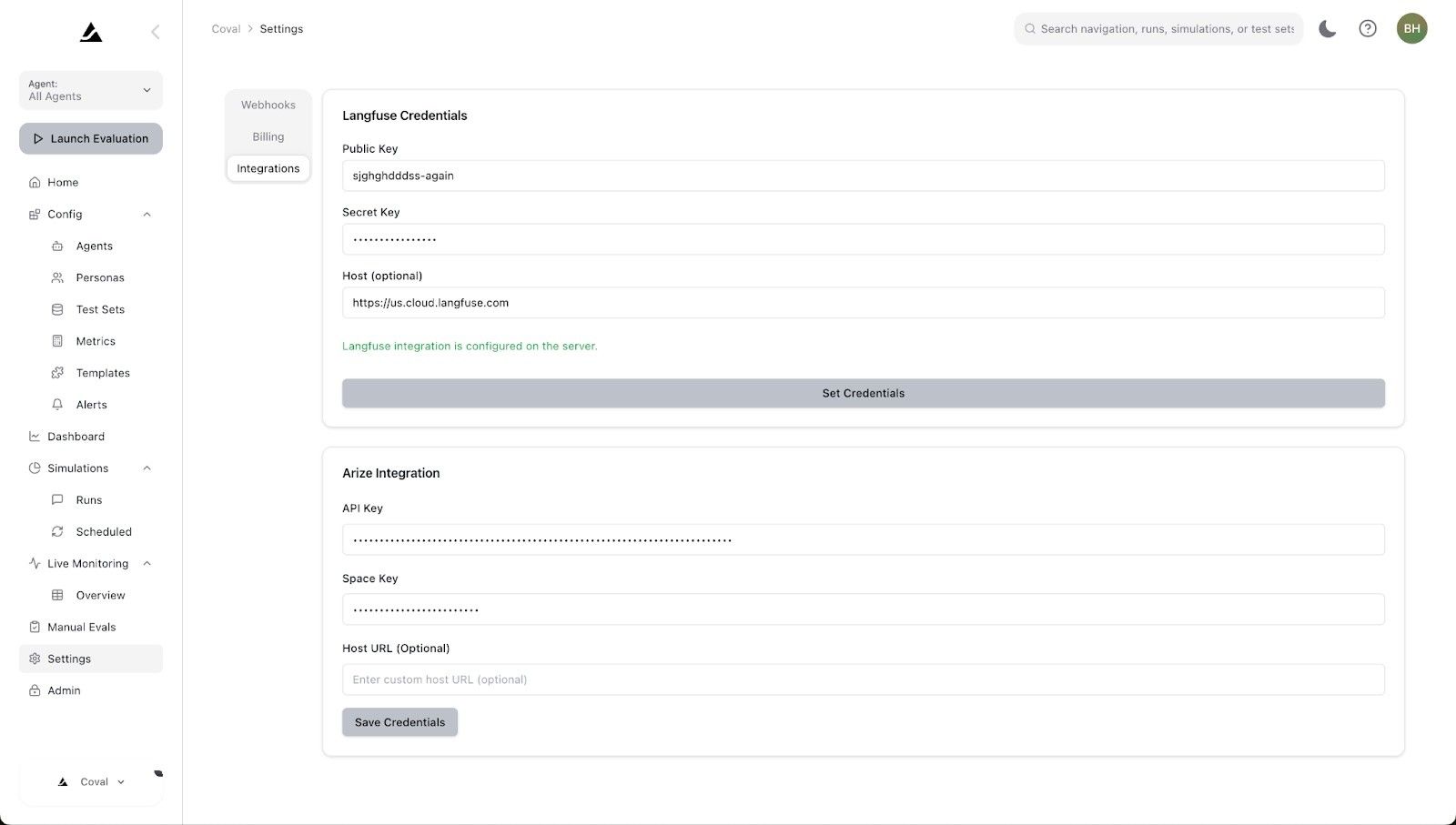
1. Add Your API Keys
Configure Coval to pull traces from your Arize instance by adding your API keys in the Coval dashboard.
2. Conversation-Level Simulation & Evaluation
Once connected, Coval can:
- Pull conversation data from Arize traces
- Run automated conversation simulations
- Evaluate conversation quality metrics
- Generate comprehensive performance reports
Arize Deep Dive Capabilities
System-Level Monitoring
Use Arize to analyze:
Technical Performance
- API response times and latencies
- Audio processing pipeline performance
- Token usage and costs
- Error rates by system component
Audio Processing Metrics
- Speech-to-text accuracy
- Audio quality scores
- Processing buffer sizes
- Compression and encoding efficiency
Model Performance
- Response generation times
- Context window utilization
- Temperature and parameter effects
- Function calling success rates
Debugging with Arize Traces
# Example: Investigating slow response times
# In Arize dashboard, filter traces by:
# - response.generation span duration > 2000ms
# - Analyze token counts, model parameters
# - Examine audio processing pipeline bottlenecks
# - Check for API rate limiting or failures
Coval Conversation Analysis
Conversation Metrics
- Tool call evaluation
- Conversation flow analysis
- User satisfaction scoring
- Response quality assessment
Arize Prompt and Tool Evaluation
- Unit-level testing of prompts
- Tool calling accuracy
- Context management evaluation
Integration Workflow
Daily Monitoring Workflow
System Monitoring in Arize
- Monitor technical performance metrics
- Track error rates and system health
- Analyze API usage and costs
- Debug technical issues in real-time
Conversation Analysis in Coval
- Pull daily conversation data from Arize
- Evaluate conversation quality metrics
- Run automated conversation simulations
- Generate conversation performance reports
Combined Insights
- Correlate system performance with conversation quality
- Identify technical issues affecting user experience
- Optimize both system parameters and conversation flows
Continuous Improvement Process
# Weekly improvement cycle
def weekly_analysis():
    # Pull system traces from Arize
    system_metrics = arize.get_system_metrics(period="week")

    # Pull conversation data to Coval
    conversations = coval.pull_conversations(period="week")

    # Analyze correlations
    correlation_analysis = coval.analyze_system_conversation_correlation(
        system_metrics=system_metrics,
        conversations=conversations
    )

    # Generate improvement recommendations
    recommendations = coval.generate_recommendations(
        analysis_results=correlation_analysis,
        improvement_areas=["latency", "accuracy", "user_satisfaction"]
    )

    return recommendations
Best Practices
Arize Configuration
- Instrument all critical system events
- Include comprehensive span attributes
- Store audio files in accessible cloud storage
- Set up alerting for system anomalies
- Use proper error handling and logging
Coval Usage
- Regular conversation pulls for fresh data
- Define clear evaluation criteria
- Use representative conversation samples
- Set up automated evaluation pipelines
- Compare performance across time periods
Data Management
- Maintain consistent audio file naming conventions
- Implement proper access controls for sensitive conversations
- Archive old conversation data appropriately
- Ensure GDPR/privacy compliance for voice data
- Regular backup of evaluation results
Troubleshooting
Common Integration Issues
Coval Cannot Pull Traces from Arize
- Verify API key permissions and space access
- Check that traces exist in the specified time range
- Ensure model IDs match between Arize and Coval
- Validate network connectivity and firewall settings
Missing Conversation Data
- Confirm that conversation spans are properly structured in Arize
- Check that audio URLs are accessible to Coval
- Verify conversation identification logic
- Review trace aggregation settings
Evaluation Failures
- Validate conversation data format and completeness
- Check evaluation template syntax and criteria
- Ensure sufficient conversation samples for analysis
- Monitor API rate limits for evaluation models
Conclusion
The combination of Arize and Coval provides a complete voice AI evaluation solution:
- Arize gives you deep technical observability into your voice AI system’s internal operations, allowing you to monitor performance, debug issues, and optimize system-level components
- Coval leverages this detailed trace data to provide conversation-level insights, simulation capabilities, and comprehensive evaluation of user experiences
This two-tier approach ensures you can maintain both technical excellence and conversation quality in your voice AI applications. Start by implementing comprehensive Arize tracing, then use Coval to pull this data for higher-level conversation analysis and optimization.